Overview #
DnXT Reviewer is the review and analysis application within the DnXT Suite, purpose-built for regulatory professionals who need to examine, annotate, and track eCTD dossier submissions. Whether you are reviewing a single submission for completeness or analyzing the full lifecycle of an application across dozens of sequences, Reviewer provides the tools you need to work efficiently and with confidence.
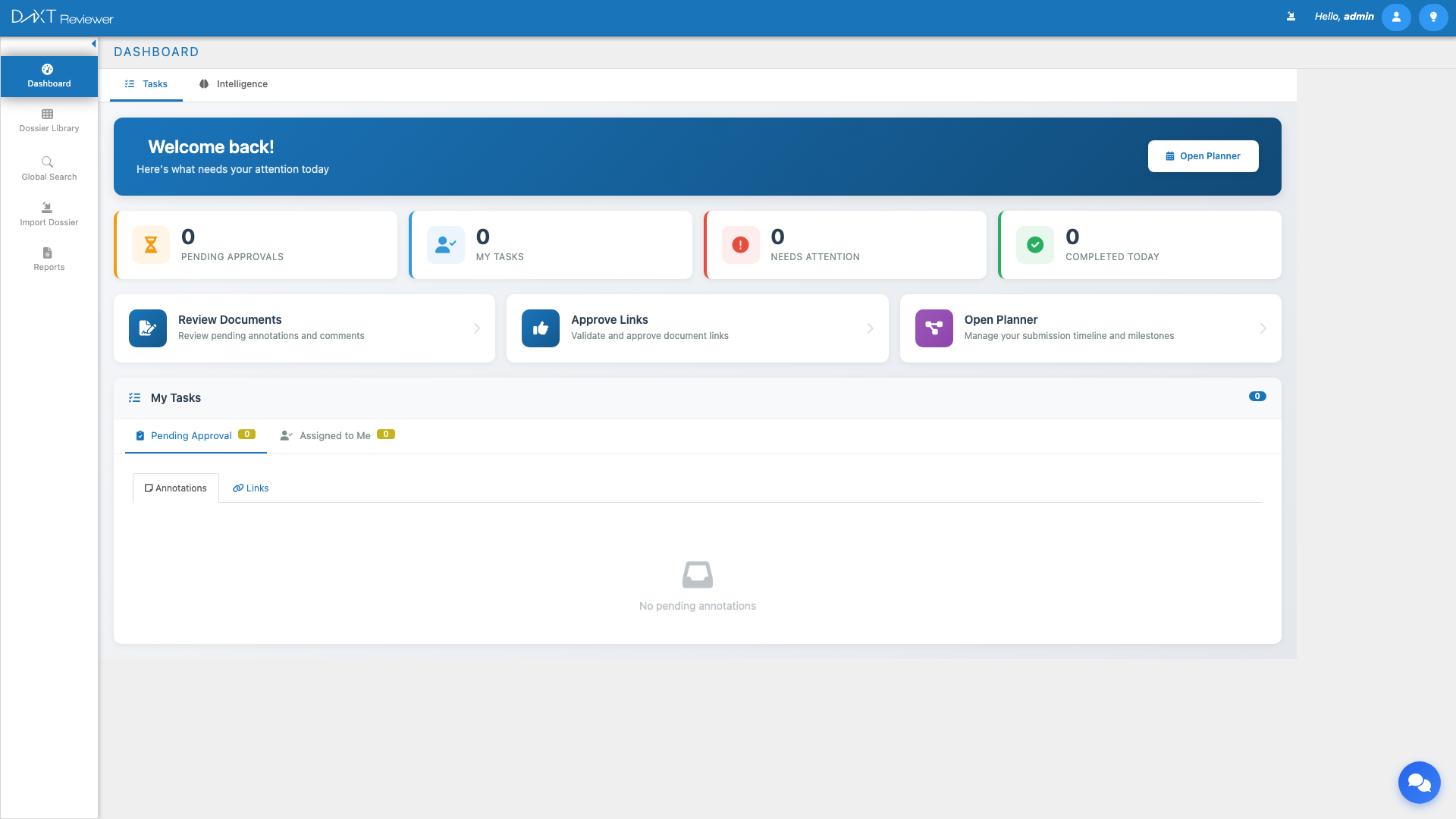
This guide walks you through your first steps in DnXT Reviewer: how to access the application, what you will see when you log in, and how the major modules connect to form a complete review workflow.
What Is DnXT Reviewer? #
DnXT Reviewer is designed for regulatory affairs teams, quality reviewers, and operations managers who need to:
- Import and organize eCTD dossier submissions from local file systems, ZIP archives, or Veeva Vault repositories
- Browse and review submission content through an interactive Table of Contents (TOC) tree with an integrated document viewer
- Annotate documents with comments, assign review tasks, and create cross-document links
- Track regulatory intelligence through dashboards that visualize submission trends, regional distributions, and application types
- Generate reports including chronology timelines, labeling history analysis, specification dashboards, and correspondence tracking
- Leverage AI-powered analysis for change detection, document enrichment, and classification across your regulatory portfolio
Accessing DnXT Reviewer #
System Requirements #
Before logging in, verify that your system meets the minimum requirements:
| Requirement | Details |
|---|---|
| Browser | Google Chrome (latest), Microsoft Edge (Chromium-based), Firefox (latest) |
| Screen Resolution | 1280 x 720 minimum; 1920 x 1080 recommended |
| JavaScript | Must be enabled in browser settings |
| Network | Access to your organization’s DnXT cloud instance or on-premise server |
| Credentials | Username and password provided by your DnXT Administrator |
Logging In #
Follow these steps to access DnXT Reviewer:
- Open your web browser and navigate to your organization’s Reviewer URL (typically
https://[your-domain]/Reviewer/Login.html). - Enter your Username in the format
username@TenantName. - Enter your Password.
- Click the Login button.
First Login Checklist #
After your first successful login, we recommend completing these setup tasks:
- Set up your profile — Click your name in the top-right corner and select My Account to review your user details and preferences.
- Explore the Dashboard — The Dashboard is your landing page. Familiarize yourself with the Tasks and Intelligence tabs.
- Configure a Repository — Before you can import dossiers, you need at least one repository configured. Navigate to Left Sidebar → Repository to add one.
- Import your first dossier — Navigate to Left Sidebar → Import Dossier to bring eCTD submissions into Reviewer.
Navigating the Reviewer Interface #
DnXT Reviewer follows the same interface layout as all DnXT Suite applications. The screen is divided into four main areas:
Header Bar #
The top bar contains the DnXT logo (click to return to Dashboard), the application name (“Reviewer”), navigation menus, notification indicators, and your user greeting. The lightbulb icon provides access to Help documentation and version information.
Left Sidebar #
The left sidebar is your primary navigation. In Reviewer, you will see the following menu items:
| Menu Item | Description |
|---|---|
| Dashboard | Home page with task management and regulatory intelligence visualizations |
| Dossier Library | Browse, search, and manage all imported dossiers and submissions |
| Import Dossier | Import new dossiers from repositories, ZIPs, or folders |
| Repository | Configure and manage file storage repositories |
| Reports | Access Chronology, Labeling History, Specifications, Correspondence, and other reports |
Main Workspace #
The center area displays the content for the currently selected module. This area adapts to show dashboards, data tables, TOC trees, document viewers, charts, and report panels depending on which module you are using.
Collapsing the Sidebar #
Click the arrow icon at the top of the left sidebar to collapse it to icon-only mode. Hover over icons to see tooltips. Click the arrow again to expand. You can also set the default state in My Account → Settings → Hide labels for main menu.
Understanding the Reviewer Workflow #
A typical review workflow in DnXT Reviewer follows this pattern:
- Set up repositories — Configure connections to your eCTD file storage (local filesystem or Veeva Vault).
- Import dossiers — Browse your repository and import application dossiers with their submission sequences.
- Browse the Dossier Library — View all imported dossiers, filter by region, type, or status, and select submissions for review.
- Review with the TOC — Open a submission to explore its Table of Contents tree, view documents, and inspect metadata.
- Annotate and link — Add annotations (comments, review notes) to documents and create cross-document links for traceability.
- Analyze with Reports — Use the Chronology, Labeling History, Specification Dashboard, and Correspondence reports to gain deeper insights.
- Track tasks — Monitor pending approvals, assigned tasks, and review progress from the Dashboard.
Key Concepts #
Before diving into each module, familiarize yourself with these core concepts:
Dossiers and Submissions #
A dossier (also called an application) represents a regulatory application such as an IND, NDA, BLA, or MAA. Each dossier contains one or more submissions (also called sequences), which are the individual filings sent to a health authority. Reviewer organizes content hierarchically: Dossier → Submission → Modules → Sections → Documents.
eCTD Structure #
Reviewer supports the electronic Common Technical Document (eCTD) format, which organizes content into five modules:
- Module 1 — Regional Administrative Information
- Module 2 — Common Technical Document Summaries
- Module 3 — Quality
- Module 4 — Nonclinical Study Reports
- Module 5 — Clinical Study Reports
Additionally, Reviewer supports STF (Submission Text Files) metadata associated with leaf-level documents.
Current vs. Cumulative View #
When reviewing a submission’s TOC, you can switch between Current view (showing only documents in this specific sequence) and Cumulative view (showing all documents accumulated across all sequences up to and including this one). This distinction is critical for understanding the complete state of a regulatory dossier at any point in time.
Annotations and Links #
Annotations are review comments, questions, or approval notes attached to specific documents. Links are cross-references between documents within or across submissions. Both can be filtered, exported, and tracked through the review process.
Repositories #
A repository is a configured connection to a file storage location where eCTD dossiers reside. Reviewer supports Filesystem (network shares, local paths) and Veeva Vault (cloud document management) repository types.
Quick Start Guide #
Ready to get started? Follow this accelerated path to begin reviewing dossiers within minutes:
| Step | Action | Where |
|---|---|---|
| 1 | Log in to Reviewer | Login page |
| 2 | Add a repository (if none exist) | Left Sidebar → Repository |
| 3 | Import a dossier | Left Sidebar → Import Dossier |
| 4 | Open a dossier from the library | Left Sidebar → Dossier Library |
| 5 | Review documents in the TOC viewer | TOC View (opens from Dossier Library) |
| 6 | Add annotations or check reports | Document Viewer → Annotations panel |
Getting Help #
If you need assistance while using DnXT Reviewer:
- In-app help — Click the lightbulb icon in the header bar to access help articles and the About dialog.
- Documentation — Visit the DnXT Solutions Help Center for detailed guides on every feature.
- Support — Contact your DnXT Administrator or reach out to DnXT Solutions support for technical assistance.
Frequently Asked Questions #
Can I use Reviewer without Publisher? #
Yes. DnXT Reviewer is a standalone application. You can import dossiers directly from file system repositories, ZIP uploads, or Veeva Vault without needing DnXT Publisher. However, if your organization also uses Publisher, dossiers published there can be synced to Reviewer for review.
How many dossiers can Reviewer handle? #
Reviewer is designed to support large regulatory portfolios. There is no hard limit on the number of dossiers or submissions. The Dossier Library supports infinite scroll and efficient filtering to help you navigate large collections.
What file formats does the document viewer support? #
The integrated document viewer supports PDF, XML, HTML, and common image formats. PDFs are rendered in a full-featured viewer with zoom, page navigation, and annotation tools. XML files are displayed with syntax highlighting.
Can I import non-eCTD folders? #
Yes. The Import Dossier module supports both eCTD and Folders folder types. The Folders option allows you to import non-eCTD structured content for general review purposes.
How do I switch between Reviewer and other DnXT apps? #
Click the hamburger menu (three horizontal lines) in the top-left corner of the header bar. This opens a dropdown menu where you can select Publisher, Reviewer, or Administrator depending on your access permissions.
Related Articles #
- Dashboard Overview — Detailed guide to the Tasks and Intelligence tabs
- Importing Dossiers — Step-by-step import from repositories
- Repository Management — Setting up Filesystem and Veeva repositories
- Reviewing Submissions with TOC — Navigating the Table of Contents tree
- Reports Overview — Exploring all available report types